As you might have read, Oracle is committed to OpenOffice.
As a long term follower of Oracles policy, especially its adoption of open standards, I'm pretty convinced that they will push forward OpenOffice development. First thing, Oracle made an announcement. This is definitely a good way to show commitment and support.
If OpenOffice is under the tight grip of the coroners of innovation, is there any hope for an open and free office suite?
My hope rests on LibreOffice.
Showing posts with label General. Show all posts
Showing posts with label General. Show all posts
Sunday, 17 October 2010

Friday, 1 October 2010
New layout
How do you like our new layout? After setting up so many blogs for friends and family, I decided to give it a try for myself.
I have neglected this blog for a while. Why?
First, Ubuntu has grown up. It's a stable and solid platform. I still think that OpenOffice should get some attention (which I sincerely hope it does with LibreOffice).
Second, there is enough material available on the net and in magazines specialized in Ubuntu. My input is not required anymore.
Third, I am slightly disappointed with Canonical and the way things develop.
I have neglected this blog for a while. Why?
First, Ubuntu has grown up. It's a stable and solid platform. I still think that OpenOffice should get some attention (which I sincerely hope it does with LibreOffice).
Second, there is enough material available on the net and in magazines specialized in Ubuntu. My input is not required anymore.
Third, I am slightly disappointed with Canonical and the way things develop.
- Canonical does not take leadership in bringing Linux to the forefront of information technology.
- They allow kids to provide code in an uncontrolled and immature way.
- Error elimination is not carried out in a professional manner.
- Separation of communities, Launchpad, maintenance and development leads to nonexisting responsibilities.
Ubuntu by far is not ready for prime market. There is a spark but no fire.
Canonical and its leader could put emphasis on a mature and competitive development environment. They can put pressure on the Gnome team to come up with something like pyGTK. They can claim a stable and working office suite.
The window of opportunity is closed now. Microsoft has once again settled its business with Windows 7. Vista is forgotten.
With Office 2010 and Sharepoint 2010 they have forced their installed base to migrate from older platforms successfully. Visual Studio 2010 is unmet in the computer industry.
All left for open source affictionados is to wait for Microsoft to suffocate on it's own inability to innovate. The rest will be dealt by the big 3 that will challenge themselfs in patent lawsuits.
With all this happening around me I seriously considered changing to the dark side (Mac or Windows).
I shared my experience on Ubuntu with you for the last 3 1/2 years. I hope it helped. I think now is the time to consider moving on to something different.
Saturday, 13 March 2010
Moving title bar buttons to the left
I always liked the Mac style of the buttons in the window title bar: LEFT.
Gnome (as well as KDE or XFCE) show them on the right of the window title by default.
Historically, Microsoft could not simply copy all of Macitoshs interface so they "invented something new". Buttons to minimize, maximize and close the window are shown on the right of the title bar.
OK, it's different, but on second thought, it is stupid as well. On a Mac (as on my Linux box) everything having to do with commands is in the top left corner (general menus, window menues, etc.). So why move the mouse to the far left of a page to manpulate window controls?
Cut a long monologue short: How to get the buttons from right to left?
I have done this on my machines and the theme now looks perfect.
Gnome (as well as KDE or XFCE) show them on the right of the window title by default.
Historically, Microsoft could not simply copy all of Macitoshs interface so they "invented something new". Buttons to minimize, maximize and close the window are shown on the right of the title bar.
OK, it's different, but on second thought, it is stupid as well. On a Mac (as on my Linux box) everything having to do with commands is in the top left corner (general menus, window menues, etc.). So why move the mouse to the far left of a page to manpulate window controls?
Cut a long monologue short: How to get the buttons from right to left?
gconf-editorSearch for the key:
/apps/metacity/general/button_layoutReplace the colon right to menu with a comma and place the colon at the end of the line. You can place the colon any place you want to separate left from right buttons.
I have done this on my machines and the theme now looks perfect.
Saturday, 16 January 2010
Could Canonical care less?
Happy new year,
I ask myself, is it happy really? After installing 9.10 on most of my machines last year, I run into every little error that one can imagine:
Were they reported? YES
Were they fixed? NO
Linux a franchise system
In a franchise system you have an idea about a business. You buy into it, get the proceedings, marketing material and the right to pretend to be part of something bigger. Franchise systems are more or less stringent. In the end, you save on preparing the market and can start the business right away.
A Linux distribution is similar. You decide which distribution you want, install it and live with whatever you got. Take SuSE, get a green GUI and KDE as the engine. You get a load of applications, need it or not. Take Fedore, you get blue and can choose between desktop engine and apps. Take Ubuntu and you can be sure to end up in the brown.
Initially Ubuntu claimed to provide well selected best in breed applications.
I'm not sure this is the case anymore. Telepathy follows Pidgin, PiTiVi follows GIMP, ...
Does Canonical care?
I have read about initiatives at Canonical to reduce the number of open errors. At the time, I was delighted.
Today, I look back at times when errors where treated as what they are: ERRORS.
All of the above mentioned errors (name it issues, problems, shortcomings, what ever) where not there in previous releases. They were introduced as part of system upgrades.
I reported these errors only to have them change from new error to either incomplete (at best), triaged (whatever that means, usually an acronym for: we wont fix it), fixed (interesting, no new version issued), wishlist (printing is more a requirement than a wish for some of us) or next release (which usually comes with recomendations to install e.g. 10.4 pre-alpha).
Frankly: I do not think that Canonical cares any more.
Frankly: I think Canonical lost focus
Frankly: I think we should seriously evaluate alternatives
Could Canonical care less?
I don't think they could care less than they do right now. I wished some executives had the insight that this is neither going to help the open source community nor Linux nor Ubuntu nor Canonical in the long run.
I ask myself, is it happy really? After installing 9.10 on most of my machines last year, I run into every little error that one can imagine:
- Left mouse button constantly not recognized (requires restart of GNOME)
- Fan operates at full speed (acpi reports hot components even though machine is quite cool)
- Suspend to RAM takes for ages (3 minutes fan runs on full speed, machines does ... what exactly does it?)
- Resume from suspend brings the machine to sleep (have to wake it up again) every second sleep
- scanning with xsane does not work (scanner still not recognized)
- printing large documents sends garbage to the printer (large documents being 1 page documents with one picture on it) which terminates with CRC errors
- CUPS does not allow canceling and restart of print jobs. Requeue does not work either
- burning CD images is not possible. Brasero eats raw CDs
- OpenOffice does not honor screen settings (like font size). Every other launch, my menus and fonts are microscopic
- OpenOffice screen updates provide spurious artefacts (some lines are drawn only half in height, tables are squeezed, images are cut in half). Page down and up usually resolves this
- Launchpad does not accept errors being reported the conventional way. It requires to send error reports from the help menu
- Evolution terminates when sending mails to distribution lists that contain members with quotation marks and without in the same list (no kidding you). Distribution lists cannot be edited if there are similar entries in the address book.
- SD cards are not recognized or automounted on most notebooks
- Screen resolution cannot be changed on notebook screens. External connectors do not allow to choose between screen duplication or extension any more
- Battery charge lasts for less than two hours on my major notebook. The same notebook with an 8.10 image reports 4h36 minutes on a full power pack
Were they reported? YES
Were they fixed? NO
Linux a franchise system
In a franchise system you have an idea about a business. You buy into it, get the proceedings, marketing material and the right to pretend to be part of something bigger. Franchise systems are more or less stringent. In the end, you save on preparing the market and can start the business right away.
A Linux distribution is similar. You decide which distribution you want, install it and live with whatever you got. Take SuSE, get a green GUI and KDE as the engine. You get a load of applications, need it or not. Take Fedore, you get blue and can choose between desktop engine and apps. Take Ubuntu and you can be sure to end up in the brown.
Initially Ubuntu claimed to provide well selected best in breed applications.
I'm not sure this is the case anymore. Telepathy follows Pidgin, PiTiVi follows GIMP, ...
Does Canonical care?
I have read about initiatives at Canonical to reduce the number of open errors. At the time, I was delighted.
Today, I look back at times when errors where treated as what they are: ERRORS.
All of the above mentioned errors (name it issues, problems, shortcomings, what ever) where not there in previous releases. They were introduced as part of system upgrades.
I reported these errors only to have them change from new error to either incomplete (at best), triaged (whatever that means, usually an acronym for: we wont fix it), fixed (interesting, no new version issued), wishlist (printing is more a requirement than a wish for some of us) or next release (which usually comes with recomendations to install e.g. 10.4 pre-alpha).
Frankly: I do not think that Canonical cares any more.
Frankly: I think Canonical lost focus
Frankly: I think we should seriously evaluate alternatives
Could Canonical care less?
I don't think they could care less than they do right now. I wished some executives had the insight that this is neither going to help the open source community nor Linux nor Ubuntu nor Canonical in the long run.
Tuesday, 27 October 2009
Ubuntu 9.10 client installation
This refers to Ubuntu 9.10 rc1.
I installed 9.10rc1 on a HP510 (2GHz, 1GB, 1280x800 i945), HPnx8220 (2GHz, 1GB, 1650x1080 ati), HP 8510w (2,4GHz, 2GB, 1920x1200 nvidia).
Installation of the core system went fine. Compiz works on all machines, the Intel chipset being the easiest, NVidia requires proprietary drivers.
Switched from Thunderbird to Evolution.
I don't know why this program gets all the hype. Its buggy (and I mean, it is hardly usable). It's a pain to configure offline synchronization (you have to set this in the Edit -> Preferences -> Mail Account -> Edit -> Receiving Options -> Automatically synchronize remote mail locally and the manually right-click the folder -> Property -> Copy folder content locally for offline operation). It's a pain to configure spam protection (in the above mentioned Account Editor you have to set Check new messages for junk content). It does not read news, it is slow and auto filtering does not work all the time.
Why did I swap: Its default, it has Exchange connectivity (not that I need it) and it syncs my Palm pilot and hopefully my Andriod phone.
Network manager still does not work correctly.
Using a mobile broadband internet connection does not work with wireless access points in reach. If wireless is turned off, the connection works fine the first time, consecutive connections do not adjust the resolver settings.
Used a manual override to fix this.
Another issue is purely annoying: Setting the mobile connection to be available system wide will lock you out of editing the settings. One can delete the connection and set it up afresh. As soon as you set system wide availability, the game starts new. Sometimes I would not even get an error message, the network manager applet would simply terminate.
Canon FB363u still does not work.
It's a shame that this used to work in 6.06 but never after. Several attempts to issue bugs failed. Canonical does not react but still provides drivers for the scanner in it's repositories.
Power management?
In 9.04 the battery on my 8510w lasted nearly 4 hours (3.57). This was ok. I remeber having heard the fan twice.
With 9.10 the battery lasts 2h20mins. Worse, ever since the upgrade the fan spins permanently and really loudly. acpi -t tells me that some device has a temperature of over 75° C. It was never that hot before.
Sound issues.
I installed additional gstreamer libraries (bad and ugly). After that I installed VLC. This seemed to render sound output dead on all my machines. Reinstalling gstreamer bad and ugly libraries solved the problem (don't know why)
VMWare ... the usual ...
I didn't expect VMWare to work out of the box. And VMware did not disappoint me.
Cut a long story short, here is the fix. There is another hint out. I did not find the problems described about mouse grabing problems on any of my machines. As I like simple solutions I followed the one on the vmware community site. It works fine.
CUPSpdf.
I used CUPSpdf a lot to print PDFs out any size. In 9.10 CUPSpdf offers adjustment of the paper size. To the application only A4 or Letter is available. I don't know what the use of bigger paper size is if one can't use it.
So where are the good news?
ext4 works fine. It's fast (boot time about 15 secs, used to be 47 secs with 9.04).
Grub2 is fine. It does what it should and stays out of your way.
firefox 3.5 is snappy.
avant window manager is a pretty add-on that makes my life pleasant and easy.
Pretty little if you ask me.
Worth your while?
If neither Windows nor Mac are an option, then the answer would be: yes.
However the pain and frustration (I still can't connect to my campus network via VPN) accumulates.
I installed 9.10rc1 on a HP510 (2GHz, 1GB, 1280x800 i945), HPnx8220 (2GHz, 1GB, 1650x1080 ati), HP 8510w (2,4GHz, 2GB, 1920x1200 nvidia).
Installation of the core system went fine. Compiz works on all machines, the Intel chipset being the easiest, NVidia requires proprietary drivers.
Switched from Thunderbird to Evolution.
I don't know why this program gets all the hype. Its buggy (and I mean, it is hardly usable). It's a pain to configure offline synchronization (you have to set this in the Edit -> Preferences -> Mail Account -> Edit -> Receiving Options -> Automatically synchronize remote mail locally and the manually right-click the folder -> Property -> Copy folder content locally for offline operation). It's a pain to configure spam protection (in the above mentioned Account Editor you have to set Check new messages for junk content). It does not read news, it is slow and auto filtering does not work all the time.
Why did I swap: Its default, it has Exchange connectivity (not that I need it) and it syncs my Palm pilot and hopefully my Andriod phone.
Network manager still does not work correctly.
Using a mobile broadband internet connection does not work with wireless access points in reach. If wireless is turned off, the connection works fine the first time, consecutive connections do not adjust the resolver settings.
Used a manual override to fix this.
Another issue is purely annoying: Setting the mobile connection to be available system wide will lock you out of editing the settings. One can delete the connection and set it up afresh. As soon as you set system wide availability, the game starts new. Sometimes I would not even get an error message, the network manager applet would simply terminate.
Canon FB363u still does not work.
It's a shame that this used to work in 6.06 but never after. Several attempts to issue bugs failed. Canonical does not react but still provides drivers for the scanner in it's repositories.
Power management?
In 9.04 the battery on my 8510w lasted nearly 4 hours (3.57). This was ok. I remeber having heard the fan twice.
With 9.10 the battery lasts 2h20mins. Worse, ever since the upgrade the fan spins permanently and really loudly. acpi -t tells me that some device has a temperature of over 75° C. It was never that hot before.
Sound issues.
I installed additional gstreamer libraries (bad and ugly). After that I installed VLC. This seemed to render sound output dead on all my machines. Reinstalling gstreamer bad and ugly libraries solved the problem (don't know why)
VMWare ... the usual ...
I didn't expect VMWare to work out of the box. And VMware did not disappoint me.
Cut a long story short, here is the fix. There is another hint out. I did not find the problems described about mouse grabing problems on any of my machines. As I like simple solutions I followed the one on the vmware community site. It works fine.
CUPSpdf.
I used CUPSpdf a lot to print PDFs out any size. In 9.10 CUPSpdf offers adjustment of the paper size. To the application only A4 or Letter is available. I don't know what the use of bigger paper size is if one can't use it.
So where are the good news?
ext4 works fine. It's fast (boot time about 15 secs, used to be 47 secs with 9.04).
Grub2 is fine. It does what it should and stays out of your way.
firefox 3.5 is snappy.
avant window manager is a pretty add-on that makes my life pleasant and easy.
Pretty little if you ask me.
Worth your while?
If neither Windows nor Mac are an option, then the answer would be: yes.
However the pain and frustration (I still can't connect to my campus network via VPN) accumulates.
Monday, 22 June 2009
Webmin 1.480
I run webmin to manage my servers. To upgrade I usually download the latest package from the webmin website and install using dpkg.
Today I saw a notification on the System Information page. Following the link upgrades to 1.480. This is the first time upgrading from within webmin worked on my servers.
If you need web based server administration, I can recommend webmin.
Today I saw a notification on the System Information page. Following the link upgrades to 1.480. This is the first time upgrading from within webmin worked on my servers.
If you need web based server administration, I can recommend webmin.
Wednesday, 22 April 2009
Ubuntu 9.04 RC disappointment
I got a bit disappointed using 9.04. I installed RC on my production machine (yes, I took a full backup, used Clonezilla btw.).
Things worked smoothly. The install went through, it just asked me to replace some files and 30 minutes later, I was up and running again.
VMware Workstation does not work any more
My notebook is a HP 8510w which runs Ubuntu 64bit. Unfortunately, VMware Workstation 6.5.1 did not run any more. The network modules could not be found.
OK, there is a new version out 6.5.2. But: Downloading the RPM works fine, the plain vanilla bundle is corrupt. Does VMware not know or recognize this?
So: No VMware Workstation (and thus) no way to test other things (like ext4). This happened in April 2009 let me add. We do have 64bit machines out there.
On a note by, VMware Workstation 6.5.2 works fine on a 32bit OS.
Gnome freezes
I used a mobile internet connection from Vodaphone today. After use, I tried to disconnect from my provider. The machine froze on disconnect. Not one, not twice, 4 times reproducably.
Most ot the time I put the machine in suspend mode. Every 5 times, Gnome does not react to wakeup calls. I get the background of the password entry dialog, but no entry field, no way to get into the machine.
Up till 8.10 I had the chance to restart Gnome using the well known Ctrl-Alt-Back key combination. Someone had a brilliant idea and disabled this last resort handler. So, now if Gnome freezes, I have to reboot the machine.
Another issue that happens regularly is my bluetooth mouse does not get recognized after boot. I have to turn it off and on to get it recognized (which itself takes several seconds).
Buggy Network Manager
I connect to my infrastructure using a wireless LAN. I like to sit on my balcony on a warm April evening and like ... ok, you are not here to read about my leasure activities.
I use WPA2 private to connect to a Netgear router. There are about 30+ wireless routers in the neighborhood so I turned my SSID broadcast of.
Network manager disconnects regularly when there are more than 10+ SSIDs seen. Most of the time it does not even attempt to reconnect. I like this to happen during downloads especially.
Disconnects happen every 8 hours or so.
Sometimes the machine tries to reconnect. It does not succeed and brings up a dialog to log on to the network.
Lukily one can observe the password that is there as the default.
Unfortunately its not the password, but the password hash. This is retrieved from the keyring manager.
So, I filed a bug, that the logon dialog in the network manager applet takes the wrong credentials.
I'm the only person having this?
I get an answer telling me, I am wrong. I'm puzzled. I can see the wrong password, I can enter the correct one (and get connected again) and this guy says that the correct password is used?
So besides my observations that the password hash instead of the password is used, I download the sources.
I'm no C guru any more (I used to program in C some 20 years ago). But I found some suspicously looking files (wpa2.. wireless... .c and .h). I open them in Geany and low and behold, I find two routines that get called.
One gets called after a first connect and it uses the password, runs it through a hashing function and sends it to the connecting routine.
The other is called whenever the is the need to reconnect. It retrieves the password hash, hashes it and forwards it to the connection routing.
I send the two files to the guy telling me, I'm wrong.
That happened 2 weeks ago. I update daily but there was no update on network manager applet so far.
How long do I have to wait for a working connection (that, btw. was perfectly working in 7.10)?
Never ending scanning story...
I do not want to go into details about scanning. I use a Canon FB630U. It's old but it works. It is supposed to be supported. But since 7.04 scanning with this scanner is not possible any more.
I file a bug every release and it gets piled up, but there seem to be no one that works on these issues.
SD cards
I have a camera that uses SD cards and I have an SD card reader on my notebook. One would think that getting pictures from my camera into my notebook is easy. Well: it's not.
The card reader recognises the inserting of SD cards. But Gnome does not mount them always. I have not figured out why it does not mount the card. At first I beleived that certain cards were formated malformed. But the same card gets recognised on monday and ignored on tuesday.
Should you use 9.04?
I cannot recommend 9.04. Im sorry to say.
Basic error correction by Canonical is minuscule to non existent.
The software is not ready for prime use. Experimental yes, but not stable.
If you have the chance to test, do so. If you want to upgrade: DO A BACKUP. If you never did and relied on Ubuntu quality, DON'T DO IT THIS TIME.
Stay with 8.10 if you can (and want). 9.10 is out soon.
Stay tuned, as I am not giving up on trying to help improve Ubuntu.
If you think that this is normal: Download Fedora 11 beta and test all of the above mentioned issues. You will be surprised. Nothing fails in Fedora (thats why I know, my scanner works actually).
Things worked smoothly. The install went through, it just asked me to replace some files and 30 minutes later, I was up and running again.
VMware Workstation does not work any more
My notebook is a HP 8510w which runs Ubuntu 64bit. Unfortunately, VMware Workstation 6.5.1 did not run any more. The network modules could not be found.
OK, there is a new version out 6.5.2. But: Downloading the RPM works fine, the plain vanilla bundle is corrupt. Does VMware not know or recognize this?
So: No VMware Workstation (and thus) no way to test other things (like ext4). This happened in April 2009 let me add. We do have 64bit machines out there.
On a note by, VMware Workstation 6.5.2 works fine on a 32bit OS.
Gnome freezes
I used a mobile internet connection from Vodaphone today. After use, I tried to disconnect from my provider. The machine froze on disconnect. Not one, not twice, 4 times reproducably.
Most ot the time I put the machine in suspend mode. Every 5 times, Gnome does not react to wakeup calls. I get the background of the password entry dialog, but no entry field, no way to get into the machine.
Up till 8.10 I had the chance to restart Gnome using the well known Ctrl-Alt-Back key combination. Someone had a brilliant idea and disabled this last resort handler. So, now if Gnome freezes, I have to reboot the machine.
Another issue that happens regularly is my bluetooth mouse does not get recognized after boot. I have to turn it off and on to get it recognized (which itself takes several seconds).
Buggy Network Manager
I connect to my infrastructure using a wireless LAN. I like to sit on my balcony on a warm April evening and like ... ok, you are not here to read about my leasure activities.
I use WPA2 private to connect to a Netgear router. There are about 30+ wireless routers in the neighborhood so I turned my SSID broadcast of.
Network manager disconnects regularly when there are more than 10+ SSIDs seen. Most of the time it does not even attempt to reconnect. I like this to happen during downloads especially.
Disconnects happen every 8 hours or so.
Sometimes the machine tries to reconnect. It does not succeed and brings up a dialog to log on to the network.
Lukily one can observe the password that is there as the default.
Unfortunately its not the password, but the password hash. This is retrieved from the keyring manager.
So, I filed a bug, that the logon dialog in the network manager applet takes the wrong credentials.
I'm the only person having this?
I get an answer telling me, I am wrong. I'm puzzled. I can see the wrong password, I can enter the correct one (and get connected again) and this guy says that the correct password is used?
So besides my observations that the password hash instead of the password is used, I download the sources.
I'm no C guru any more (I used to program in C some 20 years ago). But I found some suspicously looking files (wpa2.. wireless... .c and .h). I open them in Geany and low and behold, I find two routines that get called.
One gets called after a first connect and it uses the password, runs it through a hashing function and sends it to the connecting routine.
The other is called whenever the is the need to reconnect. It retrieves the password hash, hashes it and forwards it to the connection routing.
I send the two files to the guy telling me, I'm wrong.
That happened 2 weeks ago. I update daily but there was no update on network manager applet so far.
How long do I have to wait for a working connection (that, btw. was perfectly working in 7.10)?
Never ending scanning story...
I do not want to go into details about scanning. I use a Canon FB630U. It's old but it works. It is supposed to be supported. But since 7.04 scanning with this scanner is not possible any more.
I file a bug every release and it gets piled up, but there seem to be no one that works on these issues.
SD cards
I have a camera that uses SD cards and I have an SD card reader on my notebook. One would think that getting pictures from my camera into my notebook is easy. Well: it's not.
The card reader recognises the inserting of SD cards. But Gnome does not mount them always. I have not figured out why it does not mount the card. At first I beleived that certain cards were formated malformed. But the same card gets recognised on monday and ignored on tuesday.
Should you use 9.04?
I cannot recommend 9.04. Im sorry to say.
Basic error correction by Canonical is minuscule to non existent.
The software is not ready for prime use. Experimental yes, but not stable.
If you have the chance to test, do so. If you want to upgrade: DO A BACKUP. If you never did and relied on Ubuntu quality, DON'T DO IT THIS TIME.
Stay with 8.10 if you can (and want). 9.10 is out soon.
Stay tuned, as I am not giving up on trying to help improve Ubuntu.
If you think that this is normal: Download Fedora 11 beta and test all of the above mentioned issues. You will be surprised. Nothing fails in Fedora (thats why I know, my scanner works actually).
Saturday, 7 March 2009
Ubuntu Theme on Launchpad
I created a Launchpad project:
Feel free to experiment, comment and criticise.
Austrian Ubuntu Theme (aut)You'll find a tar.gz file there which you can install using the System / Preferences / Appearance control panel.
Feel free to experiment, comment and criticise.
Monday, 9 February 2009
Ubuntu Theme takes shape
As I struggle my way through the configuration files, GTK+ documentation and some source code, the Ubuntu Theme takes on shape.
 I still have not found out how to distinguish between windows in the front (focused for Metacity) and the ones in the background (normal). Having a way to differentiate would allow for different coloring of widgets. This in turn would make for nice visual feedback.
Another issue I have to tackle with is figuring out the names of widgets in different applications. Not all of them are documented in the GTK documentation.
Finally my icons in the top panel grew all of a sudden from nice 28 px to 32px filling the whole panel. I have no clue what I did (acutally I think I did nothing, but that certainly is not the case). I would like to think this is due to errors in all the other themes.
Ideas anybody?
 I still have not found out how to distinguish between windows in the front (focused for Metacity) and the ones in the background (normal). Having a way to differentiate would allow for different coloring of widgets. This in turn would make for nice visual feedback.
Another issue I have to tackle with is figuring out the names of widgets in different applications. Not all of them are documented in the GTK documentation.
Finally my icons in the top panel grew all of a sudden from nice 28 px to 32px filling the whole panel. I have no clue what I did (acutally I think I did nothing, but that certainly is not the case). I would like to think this is due to errors in all the other themes.
Ideas anybody?
Sunday, 8 February 2009
Awn Window Navigator
I follow development of the awn window navigator closely ever since it was first announced on Launchpad.

Awn window navigator is an Apple dock mimic. Under Gnome it acts a a panel on steriods. It lets you collect your favorite apps in a dock, supports drag-and-drop and gives nice visual feedback about the state of the application - Apple like.
Is it pretty? Yes,
Is it usefull? I'm not quite sure any more.
A shortcut collection of items makes sense if:
So why do I doubt the usefullness of it?
Basically Ubuntu comes with some shortcuts in the main panel. This dock-like panel can be populated with additional apps. It does not provide visual feedback like awn. On the other hand, it does not use extra screen space (the dock is there anyway).
Ubuntu is reduced to some essential applications. The main menu is organized in logical compartments and can be adjusted to personal preferences using the menu editor. All of this makes Ubuntu easy to use and navigate.
It is because of the combination of just providing the essential applications and the option to add ones favorite applications as shortcuts to the top panel that makes awn redundant on Ubuntu (at least in my eyes).
My recommendation: If you want to mimic Apple, use awn. If you want to work, use the panel instead.

Awn window navigator is an Apple dock mimic. Under Gnome it acts a a panel on steriods. It lets you collect your favorite apps in a dock, supports drag-and-drop and gives nice visual feedback about the state of the application - Apple like.
Is it pretty? Yes,
Is it usefull? I'm not quite sure any more.
A shortcut collection of items makes sense if:
- the set of common applications remains static most of the time
- the set of apps is limited to a few (10 - 15 apps). Otherwise the dock will be overloaded and at the most exceed screen limits
- the main screen is big enough for the extra space used by the dock
- applications are hidden behind a cumbersome access path (like menues on Windows or folders on Macs)
So why do I doubt the usefullness of it?
Basically Ubuntu comes with some shortcuts in the main panel. This dock-like panel can be populated with additional apps. It does not provide visual feedback like awn. On the other hand, it does not use extra screen space (the dock is there anyway).
Ubuntu is reduced to some essential applications. The main menu is organized in logical compartments and can be adjusted to personal preferences using the menu editor. All of this makes Ubuntu easy to use and navigate.
It is because of the combination of just providing the essential applications and the option to add ones favorite applications as shortcuts to the top panel that makes awn redundant on Ubuntu (at least in my eyes).
My recommendation: If you want to mimic Apple, use awn. If you want to work, use the panel instead.
Thursday, 5 February 2009
Trouble with gtkrc
Creating a Metacity window decoration was pretty straightforward. I have what I want. A smooth gray window title that dims when the window looses focus. When focused, it has a gradient look imitating a round vertical curve.
Here comes the catch.
Items in the window are controled by a file ~/.themes/mytheme/gtk-2.0/gtkrc. This file controls everything drawn inside the window -- buttons, menus, scrollbars - you name it.
Here is a basic gtkrc file:
1. It does not load when selected by the Appearance System panel.
2. (and this currently worries me more) I cannot lighten the window background when the window looses its focus.
I would like to change the color of the window interior when the window is in the background. This would allow for the window to visually vanish in the background.
Any hints?
Here comes the catch.
Items in the window are controled by a file ~/.themes/mytheme/gtk-2.0/gtkrc. This file controls everything drawn inside the window -- buttons, menus, scrollbars - you name it.
Here is a basic gtkrc file:
Two problems with it:
###############################################################################
# default color scheme
###############################################################################
gtk_color_scheme = "fg_color:#202020\nbg_color:#D7D7D7\nbase_color:#FFFFFF\ntext_color:#202020\nselected_bg_color:#696986\nselected_fg_color:#FFFFFF\ntooltip_bg_color:#FCF6DE\ntooltip_fg_color:#202020\n"
###############################################################################
# default style
###############################################################################
style "default"
{
##################
# Color assignment
##################
fg[NORMAL] = @fg_color # Metacity and mouseover, Most text
fg[PRELIGHT] = @fg_color # Text when mouseover
fg[ACTIVE] = @fg_color # Text when mouseclicking button, Tabs, Active window list
fg[SELECTED] = @selected_fg_color # Metacity X when window selected
fg[INSENSITIVE] = darker(@bg_color) # Insensitive Text (in menus)
bg[NORMAL] = @bg_color # Normal Background, inactive Metacity bar, buttons
bg[PRELIGHT] = @bg_color # Mouseover buttons
bg[ACTIVE] = @bg_color # Mouseclicking, Tabs, active window list
bg[SELECTED] = @selected_bg_color # Metacity Bar
bg[INSENSITIVE] = @bg_color # Insensitive buttons
base[NORMAL] = @base_color # Background, most
base[PRELIGHT] = @base_color # Mouseover menu
base[ACTIVE] = @selected_bg_color # Menu active item in inactive window
base[SELECTED] = @selected_bg_color # Menu active item in active window
base[INSENSITIVE] = @bg_color # Background, insensitive
text[NORMAL] = @text_color # Text in window
text[PRELIGHT] = @text_color # Text on Mouseover
text[ACTIVE] = @selected_fg_color # Active text in inactive window
text[SELECTED] = @selected_fg_color # Active text in active window
text[INSENSITIVE] = @bg_color # Insensitive text
xthickness = 3
ythickness = 3
}
class "GtkWidget" style "default"
style "window" = "default"
{
bg[NORMAL] = shade(0.87,@bg_color)
}
class "GtkWindow" style "window"
style "menubar" = "default"
{
GtkMenuBar :: shadow-type = GTK_SHADOW_NONE
GtkToolbar :: shadow-type = GTK_SHADOW_NONE
bg[NORMAL] = shade(0.87,@bg_color)
}
class "GtkMenuBar" style "menubar"
class "GtkToolbar" style "menubar"
style "tooltip"
{
fg[NORMAL] = @tooltip_fg_color # required in order to set the gnome default colors right
bg[NORMAL] = @tooltip_bg_color
}
widget "gtk-tooltip*" style "tooltip"
1. It does not load when selected by the Appearance System panel.
2. (and this currently worries me more) I cannot lighten the window background when the window looses its focus.
I would like to change the color of the window interior when the window is in the background. This would allow for the window to visually vanish in the background.
Any hints?
Monday, 26 January 2009
Ubuntu Theme
I have done some research on the subject. And I have received lots of "good advice" Here are some results:
6 myths to go by
This is a list of links that I found helpful:
Designing Metacity Themes - HOWTO
Understanding Metacity Themes
Metacity - Wikipedia, the free encyclopedia
GnomeArt/Tutorials
IconThemes
GtkThemes
GdmThemes
MetacityThemes
GtkEngines
Welcome | Murrine
Individuelle Metacity-Themen für GNOME
Understanding Metacity themes
Themes Blog
UsefulLinks
Useful tools
After experimenting with some tools that claim to help develop themes, I found these the most helpful:
I will publish it on SourceForge when I have tested it more thoroughly.
I also plan to write a compendium in how to write your own theme and publish it under Creative Commons. This will take some time, but I keep up to it.
Comments are welcome, hints appreciated.
6 myths to go by
- Theming Gnome is hard to do: Well, actually it is pretty easy, once you understand how Gnome displays its windows and widgets
- There is no documentation around: It's true that the Gnome technical library is somewhat sparse, incomplete and sometimes error prone. However, there are some links to good documentation. And there is the source code of course.
- Better modify an existing theme: This is a definitive NO NO as far as I am concerned. You most likely add more junk to the underlying theme, making it even more unusable.
- There are no debugging tools around: While it is true that most tools advertised to be helpful are ancient and most likely not working properly, there are few tools that help you develop and test your theme (I will cover them later).
- One can download everything from the web: There is art.gnome.org. And - yes - there are window themes, icon themes, wallpaper, logon themes and bootsplash screens. But this does not make for great design. What's missing is a thorough and complete design. That cannot be downloaded.
- A good theme has to be better than Windows or Mac OSX: I'm afraid, the only thing a good theme can do is put Ubuntu / Linux on par with both former mentioned. Everything important was built into those GUIs and Linux mimics most of the style guides.
This is a list of links that I found helpful:
Designing Metacity Themes - HOWTO
Understanding Metacity Themes
Metacity - Wikipedia, the free encyclopedia
GnomeArt/Tutorials
IconThemes
GtkThemes
GdmThemes
MetacityThemes
GtkEngines
Welcome | Murrine
Individuelle Metacity-Themen für GNOME
Understanding Metacity themes
Themes Blog
UsefulLinks
Useful tools
After experimenting with some tools that claim to help develop themes, I found these the most helpful:
- metacity-theme-viewer: this shows the window frames for all 6 window types
- metacity-window-demo: a tool to investigate gtkrc settings. It helps to optimize GTK layout
- gconftool-2 (actually gconftool-2 --type=string --set /apps/metacity/general/theme themename): sets and resets themes
- GTK_RC_FILES=~/.themes/mytheme/gtk-2.0/gtkrc Gnomeapp: this starts the gnome application with the corresponding gtkrc file. Helps to optimize GTK settings for applications and widgets.
- gtk-chtheme: a small utility to select themes and preview the GTK widgets. Currently I have not found a better tool.
- gtk-demo: even though it documents some of the widgets, it is outdated
- The Widget factory: acclaimed to be the tool of choice to present themes on art.gnome.org, this is nothing more than a showcase. Outdated
- gtk-theme-switch2: while not completely useless, it seems outdated. Some of the widgets are not shown (like scroll bars and handles). Use gtk-chtheme instead.
I will publish it on SourceForge when I have tested it more thoroughly.
I also plan to write a compendium in how to write your own theme and publish it under Creative Commons. This will take some time, but I keep up to it.
Comments are welcome, hints appreciated.
Tuesday, 23 December 2008
Ext3 vs NTFS
During my bi-anual hard disk cleanup, I had a choice to make. Every two years (or so), I upgrade my backup disks to larger capacity. This year, I got several 1 TB hard disks from Samsung (they are fast, quite, reliable, and keep cool).
As I have been using Ubuntu for more than a year without any major problems, I thought of using a native linux file system on my backup disks. What would I want to use NTFS for anyway?
I formatted the first disk to ext3. Next I copied a full 250 GB hard disk to the drive. The whole drive took 3 1/2 hours to copy. The disk was evenly populated with small, medium and large size files. When I was finished, I was quite surprised that a 250 GB NTFS disk (233 GB netto data) would require something like 360 GB disk capacity on an ext3 formatted drive (including an offset ot 14 GB disk overhead).
There are ways to format hard disks specifically to ones needs, reducing overhead and tayloring meta information to a minimum. But using the tools offered by the GUI, you have to make do with the defaults.
In a second round, I formatted the same disk to NTFS. Used space was 233 GB (which would not surprise anyone).
So, if disk space on ext3 is used more freely, is the file system faster?
I timed the copying, using an idle notebook. Here are the results:
Further tests showed a degrading performance when the disk (or directory) gets filled up. After having filled 3/4 of the disk, transfer rates lay at around 4.5 MB/sec.
Conclusio
I have not looked into this in a statistically valid way. File system layout, file size and other aspects have not been covered. From the point of disk space usage, it seems that NTFS is more efficient.
If you want to share your own observations, I look forward to reading from you.
As I have been using Ubuntu for more than a year without any major problems, I thought of using a native linux file system on my backup disks. What would I want to use NTFS for anyway?
I formatted the first disk to ext3. Next I copied a full 250 GB hard disk to the drive. The whole drive took 3 1/2 hours to copy. The disk was evenly populated with small, medium and large size files. When I was finished, I was quite surprised that a 250 GB NTFS disk (233 GB netto data) would require something like 360 GB disk capacity on an ext3 formatted drive (including an offset ot 14 GB disk overhead).
There are ways to format hard disks specifically to ones needs, reducing overhead and tayloring meta information to a minimum. But using the tools offered by the GUI, you have to make do with the defaults.
In a second round, I formatted the same disk to NTFS. Used space was 233 GB (which would not surprise anyone).
So, if disk space on ext3 is used more freely, is the file system faster?
I timed the copying, using an idle notebook. Here are the results:
Besides the fact that formating a 1 TB disk for ext3 takes some time as opposed to NTFS which takes just seconds, the NTFS file format seems to provide higher transfer rates on Ubuntu while maintaining a smaller footprint on the disk.
FS MB/sec MB on Disk ext3 15.2 346 NTFS windows formated 13.1 233,5 NTFS ntfs-3g formated 17.1 233.5
Further tests showed a degrading performance when the disk (or directory) gets filled up. After having filled 3/4 of the disk, transfer rates lay at around 4.5 MB/sec.
Conclusio
I have not looked into this in a statistically valid way. File system layout, file size and other aspects have not been covered. From the point of disk space usage, it seems that NTFS is more efficient.
If you want to share your own observations, I look forward to reading from you.
Thursday, 20 November 2008
Theme Considerations
Here are my preferences:
Lets translate this into requirements:
I also consider positioning the window buttons (max, min, close) on the top left side. This minimizes the way, you have to move the mouse.
I like my desktop to be bright and stimulating. I love a certain kind of blueish gray (or grayish blue as you like). The RGBs are #6B73A9.
I also like the aluminium decoration of the mac. It's clear, its clean and it does not distract from the task at hand. So probably brushed metal look will be nice.
I am not one to have a wild wallpaper desktop image. I prefer calm and quite abstract patterns. I get a kick out of mathematically motivated images.
Lets translate this into requirements:
- Windows are white or very light gray
- Borders are medium gray
- Menus and tool bars are same medium gray
- No separation lines between window title, menu bar and tool bars
- Windows in the background are darker than windows in the front
- Selections are my favorite gray-blue
- Information windows, tool tips and hints are a faint yellow
- Text is dark gray, not black (black is to hard on the eye)
- Window corners are rounded
- Tabs and panels should look like they are extruded a bit
- Firefox and Thunderbird have corresponding themes
- Icons are more photo realistic (however, harddrives do not have to look like the naked bare metal)
- Prefer XML definition to images (slower loading)
I also consider positioning the window buttons (max, min, close) on the top left side. This minimizes the way, you have to move the mouse.
Creating a theme for Ubuntu

Let's face it: Linux themes are pretty ugly. Ubuntu's default theme beats most of them. The brown and orange might remind Mark Shuttleworth of his origins. I will spare you the details of what it reminds ME of.
 Tangerine, ClearLooks and all the other prepacked themes are no better.
Ubuntu 8.10 comes with a new theme: DarkRoom. It makes one increasingly sucidal.
 I've tried some stock themes from art.gnome.org and gnome-looks.org. The results are sobering (On the right is the most appealing window decoration I found so far. It's called Almond and was last updated in 2006).
I envy Mac users for their simple, visually appealing and intuitive interface. It seems that neither Microsoft nor the whole Linux community can come up with something that can compare to Apples GUI.
Is it really so hard? To find out will create my own theme.
... the Austrian Ubuntu Theme (AUT) ...
Here is my plan:
- Read into the subject: I have to understand how Gnome uses Metacity and rendering engines to draw the GUI.
- Define how the theme should look like
- Modify an existing theme to learn how things interact
- Create raw minimal theme: I have to figure out what is minimally required
- Resolve extras (Panels, awn)
- Learn how icons work
- Create a customized set of icons
- Make a .deb installer to install the theme on any machine
- Test on several machines runing Ubuntu (8.04.1 LTS and 8.10) and possibly Debian
- Write a HOW-TO that covers more than the bare Gnome tutorial
- Start a SourceForge project
Tuesday, 28 October 2008
Open Source tool to migrate Outlook calendar
When I moved from Windows to Ubuntu, I faced one mayor hinderance: Outlook.
In particular, migrating calendar entries from Outlook was near impossible.
FreeMiCal
 Cut a long story short, I wrote a little program, available on SourceForge that exports all calendar items at once, regardlessly.
FreeMiCal comes as a source zip-package or just the executables (for easy use). It is written in C# and requires nothing more than a Windows machine with Outlook 2003/2007 and .NET 2.0 installed.
FreeMiCal was downloaded over 11.000 times in the last year. It seems to do the job and helps obliviate Outlooks calendar lock-in.
In particular, migrating calendar entries from Outlook was near impossible.
- OL2003 lets one export one single calendar item to iCal format (and you have to use a trick to even get there).
- OL2007 lets you export more than one entry at once, if the entries are less than 1000 and do not span more than a 10 year periode (earliest to latest entry).
FreeMiCal
Cut a long story short, I wrote a little program, available on SourceForge that exports all calendar items at once, regardlessly.FreeMiCal comes as a source zip-package or just the executables (for easy use). It is written in C# and requires nothing more than a Windows machine with Outlook 2003/2007 and .NET 2.0 installed.
FreeMiCal was downloaded over 11.000 times in the last year. It seems to do the job and helps obliviate Outlooks calendar lock-in.
Saturday, 11 October 2008
Making films in GCompris
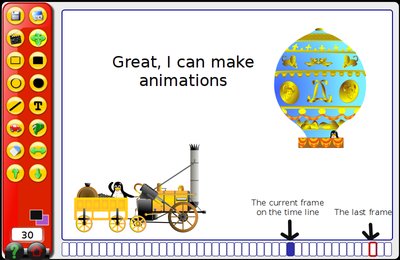
I wanted to make a film in GCompris recently. GCompris is an educational suite for children.
There is an animation program in the suite and I wanted to integrate my own characters (the set included is limited). There is a directory with a Readme file which says: All custom images in here.
Well: I can put custom images into this directory. The software stores animation sequences into this directory as well. So far so good.
Unfortunately, I cannot add my own characters to the application or my film for that.
I'm still looking for a way to add my own characters to the film. Keep you posted (appreciate hints all the same).
PS: Tyler has an important hint on how to do this. I think it's worth for everyone to read his comment. Tyler, thanks.
Friday, 10 October 2008
Lost notification icons
Sometimes I loose my notification area. This is where programs like Firestarter or Network manager put their icons to inform you about some system state.
Here is how I get them back (this is mainly a reminder as it always takes me some hours to refigure out the procedure):
Here is how I get them back (this is mainly a reminder as it always takes me some hours to refigure out the procedure):
- In the area where you want to see the notification ...+ Add to panel...
- scroll down to Notification area
- click Add...
Saturday, 4 October 2008
Easy system backup tool
Before upgrading 8.04 to 8.10 I did a full backup of my harddisk. There are several tools around but I found CloneZilla to be well suited and easy to use.
CloneZilla comes in two flavours:
CloneZilla - SystemRescueCD - SuperGrub
This is a compound bootable CD that offers both CloneZilla and SysResCD in one package. The latest version can be downloaded here. Additionally to CloneZilla this CD offers a system recovery CD and a tool that allows to repair the grub boot loader.
CloneZilla comes in two flavours:
- LiveCD (for on the fly backups)
- SE (Server Edition for workgroup or corporate backup)
CloneZilla - SystemRescueCD - SuperGrub
This is a compound bootable CD that offers both CloneZilla and SysResCD in one package. The latest version can be downloaded here. Additionally to CloneZilla this CD offers a system recovery CD and a tool that allows to repair the grub boot loader.
Saturday, 17 May 2008
Linux week in Vienna
May 15th to 17th, the Austrian chamber of commerce held their annual Linux weeks in Vienna.
Besides giving interested visitors the opportunity for hands on experiencing Linux, topics focused on
Here are some pictures of the event.
Overall, the Linux week was a great success.
Besides giving interested visitors the opportunity for hands on experiencing Linux, topics focused on
- Beginners and Switchers
- Linux in an educational environment
- Business and Government
Here are some pictures of the event.
Overall, the Linux week was a great success.
Subscribe to:
Posts (Atom)